
Diagnosis & Coding Superbill
#gallery-1 {
margin: auto;
}
#gallery-1 .gallery-item {
float: left;
margin-top: 10px;
text-align: center;
width: 100%;
}
#gallery-1 img {
border: 2px solid #cfcfcf;
}
#gallery-1 .gallery-caption {
margin-left: 0;
}
/* see gallery_shortcode() in wp-includes/media.php */
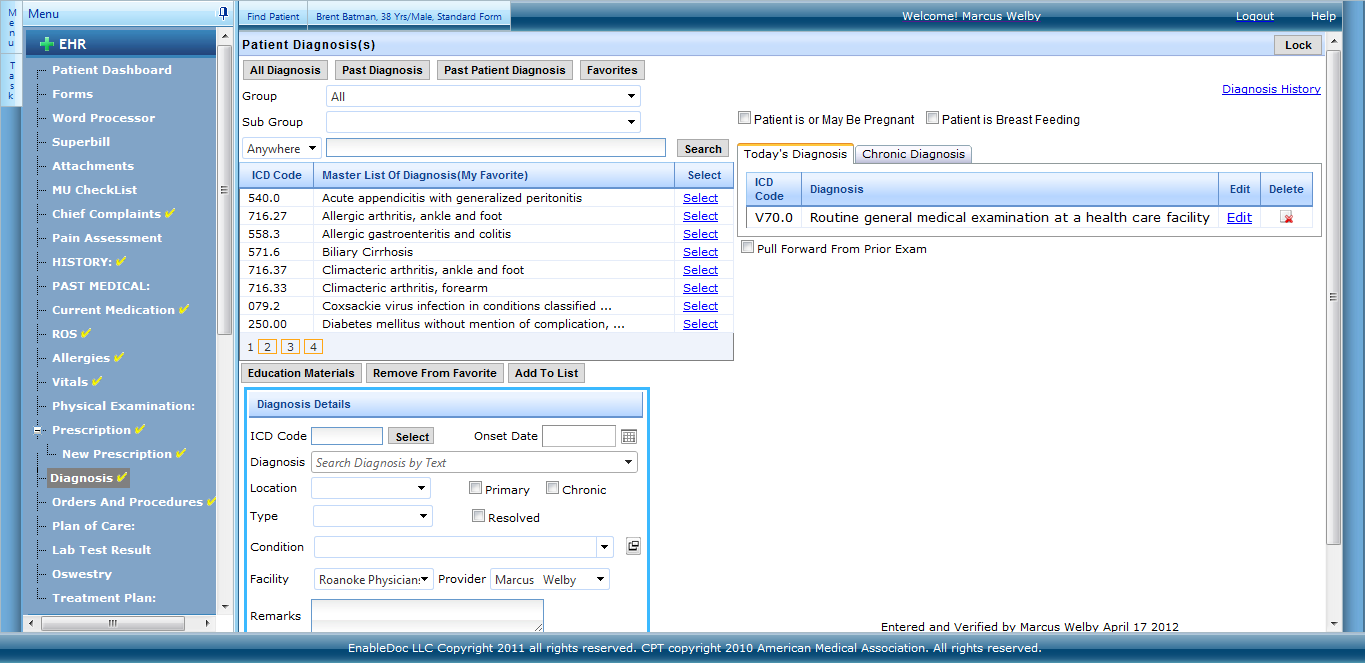
Diagnosis & Coding Superbill:
Capture diagnosis and charge codes as part of the clinical documentation process, then review and approve the superbill. Superbills can be printed from both appointments and the superbill screens. Finalizing a superbill releases the codes for claims processing. These additional features are provided:
- Order sets for diagnosis and codes can be pre-configured and saved under custom labels for one click selection.
- Search for diagnosis and charge codes based on ICD9 diagnosis database, favorites, past patient data and past provider codes used.
- We map ICD9 to ICD10 and provide other tools to recommend the correct ICD10.
- Search for diagnosis based on keywords or categories.
- Search for codes based on keywords, code category and type of code.
- Quickly access a custom favorites list, past patient diagnosis and the past diagnosis the provider has seen.
@import url(https://www.enabledoc.com/wp-content/plugins/siteorigin-panels/css/front-flex.min.css); #pgc-429-0-0 { width:100%;width:calc(100% – ( 0 * 30px ) ) } #pl-429 #panel-429-0-0-0 { } #pg-429-0 , #pl-429 .so-panel { margin-bottom:30px } #pl-429 .so-panel:last-child { margin-bottom:0px } @media (max-width:780px){ #pg-429-0.panel-no-style, #pg-429-0.panel-has-style > .panel-row-style { -webkit-flex-direction:column;-ms-flex-direction:column;flex-direction:column } #pg-429-0 > .panel-grid-cell , #pg-429-0 > .panel-row-style > .panel-grid-cell { width:100%;margin-right:0 } #pl-429 .panel-grid-cell { padding:0 } #pl-429 .panel-grid .panel-grid-cell-empty { display:none } #pl-429 .panel-grid .panel-grid-cell-mobile-last { margin-bottom:0px } }
